Wednesday, April 25, 2012
intermittent bogus frames during continuous single stepping
The issue is that CreatePauseFrame accesses a frame (m_CurFrame) which the renderer no longer owns. CreatePauseFrame accesses it indirectly via m_BackBuf, which uses the surface description m_SurfDesc, the lpSurface member of which points to the frame, having been set to m_CurFrame by the Render method. However m_CurFrame is ONLY guaranteed to be valid in Render, i.e. during the period between reading the input frame and and writing it to either the monitor or the free queue. The moment the current frame's reference count reaches zero, it no longer belongs to the renderer and can be overwritten by another thread at any time. In theory the issue could occur whenever the app pauses, but the odds are low. Continuous single stepping greatly increases the odds, by calling CreatePauseFrame in a tight loop.
It sounds scary but it's probably only a nuisance: so long as m_CurFrame still points to valid memory, the worst that can happen is an occasional bogus frame on the monitor.
If single step doesn't disable monitoring, the behavior becomes less likely, because in this case the frame is probably queued to the monitor window. The monitor window's timer hook is responsible for dequeuing and disposing of the frame, but it runs in the main thread, so it can't decrement the frame's reference count to zero while we're in SingleStep, because the main thread can't be in two places at once.
The fact that the engine stops the renderer after the plugins doesn't save us, because it doesn't guarantee that the renderer will render another frame between the time that some plugin munges the renderer's current frame just before stopping, and when the renderer worker thread stops.
A possible solution would be to change engine's Pause to do the following:
1. stop the renderer
2. wait for the render queue to contain a frame
3. pause the engine, stopping all plugin workers
4. single step the renderer, processing the queued frame
5. create the pause frame from the renderer's current frame
By the time you create the pause frame, all plugins were stopped BEFORE the final frame was rendered, so there's no one left alive to munge the current frame.
Note however that this solution breaks the normal single step, causing it to always step two frames instead of one.

Wednesday, April 11, 2012
In the works: column resizing, previews, non-AVI clips
The next version (2.2.04) is almost ready, and introduces a long-overdue feature: resizable columns in all views. It's only UI candy, but it's expected behavior and fairly low-risk. The next version also fixes a fairly serious bug which was accidentally introduced in 2.2.01: the MIDI Setup view's Plugin page is always empty, and selecting its tab can cause the view to resize incorrectly, overwriting the droplist and Learn check box.
After that, I'm considering adding a Preview bar, for previewing the output of one or more plugins. This would mostly be useful for clip players and source plugins. The bar would behave similarly to the Monitor bar, except that it would allow multiple preview windows within the bar. All the previews would be the same same size, but the number of previews would be user-selectable, along with their layout (horizontal stack, vertical stack, or tiled). The advantage of giving previews their own bar (as opposed to adding them to the existing Monitor bar) is that this allows the Monitor and Preview bars to be positioned differently in the GUI. The Monitor bar typically mirrors the program's main output, so it wants to be bigger than the previews; it may even belong on its own display (this is possible if you have enough video outputs).
I'm also working on upgrading the clip player to use DirectShow instead of VfW, so it can open non-AVI clips directly without needing AVISynth. This is a riskier proposition but it would make FFRend more user-friendly.
After that, I'm considering adding a Preview bar, for previewing the output of one or more plugins. This would mostly be useful for clip players and source plugins. The bar would behave similarly to the Monitor bar, except that it would allow multiple preview windows within the bar. All the previews would be the same same size, but the number of previews would be user-selectable, along with their layout (horizontal stack, vertical stack, or tiled). The advantage of giving previews their own bar (as opposed to adding them to the existing Monitor bar) is that this allows the Monitor and Preview bars to be positioned differently in the GUI. The Monitor bar typically mirrors the program's main output, so it wants to be bigger than the previews; it may even belong on its own display (this is possible if you have enough video outputs).
I'm also working on upgrading the clip player to use DirectShow instead of VfW, so it can open non-AVI clips directly without needing AVISynth. This is a riskier proposition but it would make FFRend more user-friendly.
Thursday, April 05, 2012
FFRend 2.2.03: Monitor source is back!
FFRend 2.2.03 is available for download. It brings back monitor source selection, a nice feature that was lost in the V2 rewrite. It also fixes some bugs.
Monitor source selection allows the monitor bar to display the output of any plugin, not just the one connected to the renderer. This was difficult to implement in V2 due to multithreading complications, so it was omitted, until now. To change the monitor source, use Plugin/Monitor (F8), the plugin context menu, or the monitor bar's context menu.
Bug fixes include a stall that occurred when stopping a recording if the final plugin had multiple threads assigned to it, and UI jerkiness when a menu was displayed while an edit control had focus.
Also, due to an embarrassing oversight, the check for updates feature introduced in 2.2.02 fails to find its installer script. 2.2.03 fixes this, or if you prefer, there's a patch available here
Please download the latest version. Here are the release notes.
Monitor source selection allows the monitor bar to display the output of any plugin, not just the one connected to the renderer. This was difficult to implement in V2 due to multithreading complications, so it was omitted, until now. To change the monitor source, use Plugin/Monitor (F8), the plugin context menu, or the monitor bar's context menu.
Bug fixes include a stall that occurred when stopping a recording if the final plugin had multiple threads assigned to it, and UI jerkiness when a menu was displayed while an edit control had focus.
Also, due to an embarrassing oversight, the check for updates feature introduced in 2.2.02 fails to find its installer script. 2.2.03 fixes this, or if you prefer, there's a patch available here
Please download the latest version. Here are the release notes.
Tuesday, April 03, 2012
streaming uncompressed video: LAN vs. HDMI capture
One of my background research projects is streaming uncompressed video (ideally at least XGA res, 30 FPS) from one PC to another over a LAN. This would allow some interesting multi-user setups, e.g.:
FFRend -> FFRend: first PC/user is providing a submix to the second PC/user.
Whorld -> FFRend: same idea
The main advantages: distributed computing (load is distributed over multiple computers), and each PC can run full-screen and have dedicated user input (mouse, keyboard, MIDI etc). Whorld -> FFRend is particularly interesting b/c the Whorld app offers a much richer user experience than the UltraWhorld plugin.
I did a quick back of the envelope calculation: 1024 x 768 x 3 = 2.36 MB x 30FPS = 70.8 MB/s. Then I tested my Gigabit LAN. With 9k jumbo frames enabled, I was able to get around 79 MB/s, as measured by Netio. That's from an i7 920 box to an i5 2500K box, through a switch, with short cables. I tried eliminating the switch but it didn't matter. Bottom line: it's a bit too close for comfort but it might work.
The next thing I tried was bigFug's streamers. I tried for an hour or so, but no luck: I could only get them working in memory mode, not in TCP or UDP. So I resigned myself to rolling my own. No big deal, it's more fun anyway. I already had the sockets code kicking around from other projects. The one thing I didn't have was fast code for busting RGB32 down to RGB24. I run in 32-bit color, but I can't afford to send the unused alpha channel over the LAN. 1024 x 768 x 4 x 30 would be 94.5 MB/s, definitely not doable.
So did some poking around on the net, but in the end it was quicker to just roll the 32/24 conversions in x86 assembler. My benchmarks say thehttp://www.blogger.com/img/blank.gify get the job done in about 500 microseconds. I could cut that in half or better using SSE3 but that's a hassle and I can't be bothered at this stage. The code is here if you need it.
Other points of interest: setting the sockets receive and send buffer sizes (SO_RCVBUF and SO_SNDBUF) is crucial. I got the best results by making them big enough to fit an entire frame. I tried disabling Nagle (TCP_NODELAY) but it turns out Nagle is helping in this case. Be careful to avoid round-trips. The send plugin should only send, and the receive plugin should only receive. Don't second-guess TCP, just relax and let it handle the bookkeeping.
So anyway I fired up my streaming plugins and discovered what I probably should have guessed: It works fine, so long as the PCs don't have much else to do. I can stream uncompressed XGA at 30 FPS with nary a hiccup, with one or maybe two (out of four) cores fully loaded by other plugins. But if I load that third core, the whole show grinds to a halt. Even though that core appears to be idle.
It's strange, because I don't show much CPU load from the streaming, even if I display kernel usage. My theory is that it's something else, maybe memory bandwidth, or bus traffic. The truth is, I just don't know why it doesn't work better.
It might work a whole lot better with 10 GB Ethernet, but the NICs are still way too expensive. So my question (finally) is: how difficult would it be to realize this scheme using HDMI capture?? I've seen cards around that claim to be able to capture uncompressed HDMI at resolutions plenty higher than XGA. The Blackmagic Intensity Pro even has a nice DirectShow API so I could presumably roll myself a Freeframe plugin to receive the incoming frames and insert them into my mix. Does this make any sense or am I just dreaming?
UPDATE: As it turns out the Blackmagic devices only output HD video resolutions (720p or 1080i).
I'm going to explore multihoming instead. According to my reading there's a decent chance I can get 120 MB/s or better using dual-port server-style NICs. The current crop from Intel looks good. Probably the CPU utilization will go down too, because with server-style cards the CPU can offload more of the work. It's a bit pricey but still cheap compared to 10 Gigabit.
HDMI capture wouldn't have solved my problem exactly anyway. The goal was basically to insert one frame stream directly into the other, so that no frames are lost. Streaming over TCP does this, and the proof is that if you pause the destination PC, flow control kicks in and the source PC pauses too. In other words the source PC is really a slave of the destination.
Unless I'm misunderstanding, with HDMI (or any other) capture, it's not master/slave, it's asynchronous: between the source and the destination you've got a display adapter which has its own clock and isn't pausing for anything. It neither knows nor cares whether the destination is capturing. If the destination pauses, the source merrily continues to output frames, and those frames are lost from the destination's point of view. This isn't what I want.
I might even try just installing some ordinary extra NICs, the $10 kind. I don't necessarily need LACP: since I have custom code, I could do my own link aggregation, e.g. by sending half the frame over one NIC and half over the other. Depending on CPU and memory bus saturation issues etc. it might not work, but it's a cheap and moderately amusing experiment.
FFRend -> FFRend: first PC/user is providing a submix to the second PC/user.
Whorld -> FFRend: same idea
The main advantages: distributed computing (load is distributed over multiple computers), and each PC can run full-screen and have dedicated user input (mouse, keyboard, MIDI etc). Whorld -> FFRend is particularly interesting b/c the Whorld app offers a much richer user experience than the UltraWhorld plugin.
I did a quick back of the envelope calculation: 1024 x 768 x 3 = 2.36 MB x 30FPS = 70.8 MB/s. Then I tested my Gigabit LAN. With 9k jumbo frames enabled, I was able to get around 79 MB/s, as measured by Netio. That's from an i7 920 box to an i5 2500K box, through a switch, with short cables. I tried eliminating the switch but it didn't matter. Bottom line: it's a bit too close for comfort but it might work.
The next thing I tried was bigFug's streamers. I tried for an hour or so, but no luck: I could only get them working in memory mode, not in TCP or UDP. So I resigned myself to rolling my own. No big deal, it's more fun anyway. I already had the sockets code kicking around from other projects. The one thing I didn't have was fast code for busting RGB32 down to RGB24. I run in 32-bit color, but I can't afford to send the unused alpha channel over the LAN. 1024 x 768 x 4 x 30 would be 94.5 MB/s, definitely not doable.
So did some poking around on the net, but in the end it was quicker to just roll the 32/24 conversions in x86 assembler. My benchmarks say thehttp://www.blogger.com/img/blank.gify get the job done in about 500 microseconds. I could cut that in half or better using SSE3 but that's a hassle and I can't be bothered at this stage. The code is here if you need it.
Other points of interest: setting the sockets receive and send buffer sizes (SO_RCVBUF and SO_SNDBUF) is crucial. I got the best results by making them big enough to fit an entire frame. I tried disabling Nagle (TCP_NODELAY) but it turns out Nagle is helping in this case. Be careful to avoid round-trips. The send plugin should only send, and the receive plugin should only receive. Don't second-guess TCP, just relax and let it handle the bookkeeping.
So anyway I fired up my streaming plugins and discovered what I probably should have guessed: It works fine, so long as the PCs don't have much else to do. I can stream uncompressed XGA at 30 FPS with nary a hiccup, with one or maybe two (out of four) cores fully loaded by other plugins. But if I load that third core, the whole show grinds to a halt. Even though that core appears to be idle.
It's strange, because I don't show much CPU load from the streaming, even if I display kernel usage. My theory is that it's something else, maybe memory bandwidth, or bus traffic. The truth is, I just don't know why it doesn't work better.
It might work a whole lot better with 10 GB Ethernet, but the NICs are still way too expensive. So my question (finally) is: how difficult would it be to realize this scheme using HDMI capture?? I've seen cards around that claim to be able to capture uncompressed HDMI at resolutions plenty higher than XGA. The Blackmagic Intensity Pro even has a nice DirectShow API so I could presumably roll myself a Freeframe plugin to receive the incoming frames and insert them into my mix. Does this make any sense or am I just dreaming?
UPDATE: As it turns out the Blackmagic devices only output HD video resolutions (720p or 1080i).
I'm going to explore multihoming instead. According to my reading there's a decent chance I can get 120 MB/s or better using dual-port server-style NICs. The current crop from Intel looks good. Probably the CPU utilization will go down too, because with server-style cards the CPU can offload more of the work. It's a bit pricey but still cheap compared to 10 Gigabit.
HDMI capture wouldn't have solved my problem exactly anyway. The goal was basically to insert one frame stream directly into the other, so that no frames are lost. Streaming over TCP does this, and the proof is that if you pause the destination PC, flow control kicks in and the source PC pauses too. In other words the source PC is really a slave of the destination.
Unless I'm misunderstanding, with HDMI (or any other) capture, it's not master/slave, it's asynchronous: between the source and the destination you've got a display adapter which has its own clock and isn't pausing for anything. It neither knows nor cares whether the destination is capturing. If the destination pauses, the source merrily continues to output frames, and those frames are lost from the destination's point of view. This isn't what I want.
I might even try just installing some ordinary extra NICs, the $10 kind. I don't necessarily need LACP: since I have custom code, I could do my own link aggregation, e.g. by sending half the frame over one NIC and half over the other. Depending on CPU and memory bus saturation issues etc. it might not work, but it's a cheap and moderately amusing experiment.
Saturday, March 31, 2012
max gigabit speed
between ckci and badbox2
test: NetCPS
jumbo 9K frames
50K writes/reads to/from socket
direct connection: 79.6 MBs
through switch: 78.0 MBs
CPU utilization: 10..15%
1024 x 768 x 3 x 25 = 58.9 MBs
1024 x 768 x 3 x 30 = 70.7 MBs
Looks like uncompressed XGA over Ethernet is doable, for sure at 25 FPS and maybe at 30.
Whorld to FFRend? FFRend to FFRend? Problem is they both use 4-byte pixels, not 3.
1024 x 768 x 4 x 25 = 78.6 MBs <- not quite! USB3 instead?
Monday, March 26, 2012
if edit control has focus, menus periodically freeze message loop
This bug was introduced in V2. FFRend 1.7.3 doesn't exhibit the bug, and the earliest version of V2 (FFRell 1.0.0.1a) does. The cause is a porting error: the following bug fix from version 1.0.3 wasn't ported into V2:
28oct06    add ProcessMessageFilter to fix edit box/menu pauses
ToDo: if an edit control has focus, menus cause periodic pauses in message loop

BOOL CFFRendApp::ProcessMessageFilter(int code, LPMSG lpMsg)
{
    // If a menu is displayed while an edit control has focus, the message loop
    // pauses periodically until the menu is closed; this applies to all menus,
    // including context and system menus, and it's a problem for timer-driven
    // apps that use edit controls.  The problem is caused by the undocumented
    // WM_SYSTIMER message (0x118), which Windows uses internally for various
    // purposes including scrolling and blinking the caret in an edit control.
    // The solution is to suppress WM_SYSTIMER, but only if the filter code is
    // MSGF_MENU, otherwise the caret won't blink while scrolling.  The caret
    // doesn't blink while a menu is displayed even without this workaround.
    //
    // if displaying a menu and message is WM_SYSTIMER
    if (code == MSGF_MENU && lpMsg->message == 0x118) {
        // use GetClassName because IsKindOf fails if the edit control doesn't
        // have a CEdit instance; see Microsoft knowledge base article Q145616
        TCHAR    szClassName[6];
        if (GetClassName(lpMsg->hwnd, szClassName, 6)
        && !_tcsicmp(szClassName, _T("Edit"))) {    // if recipient is an edit control
            return TRUE;    // suppress WM_SYSTIMER
        }
    }
    return CWinApp::ProcessMessageFilter(code, lpMsg);
}
Monday, January 23, 2012
Important FFRend bug fix; testers needed please!
The last released version of FFRend (2.2.1.5) had a bug that caused the entire desktop to flicker whenever a row view was updated. Since just about every command updates one or more row views, the desktop flickered like crazy. You'd think I would have noticed it during testing but I normally run FFRend full-screen. I'm pretty embarrassed about it. Anyway please take the latest version, which fixes this lame bug and some others too.
Download:
FFRend download
I would greatly appreciate it if any FFRend users who hang out here would take the new version out for a spin and report back if they see anything weird. I'm especially worried about the row view code, because that's what caused the desktop flicker bug in the first place. The Freeframe Parameter and MIDI Setup row views are now supposed to remember the scroll position separately for each plugin. Try switching back and forth between a plugin that's scrolled and one that isn't. Do you see any painting artifacts, or does the view paint smoothly?
This version also fixes a bunch of problems related to synchronization of oscillators between plugins, which crept in with V2 as side effects of parallel processing. The earlier versions of V2 would lose sync between plugins at the drop of a hat. It should be a lot better now. The problem was basically that in a pipeline each plugin has its own frame of reference in terms of time, so it's necessary to compensate for that in various places. To debug it I had to make a pair of special Freeframe plugins, one that stamps its parameter directly onto the frame as a number, and another that draws its parameter onto the frame as a waveform, like an oscilloscope. They're pretty handy actually. I can make them available if anyone wants them...
Download:
FFRend download
I would greatly appreciate it if any FFRend users who hang out here would take the new version out for a spin and report back if they see anything weird. I'm especially worried about the row view code, because that's what caused the desktop flicker bug in the first place. The Freeframe Parameter and MIDI Setup row views are now supposed to remember the scroll position separately for each plugin. Try switching back and forth between a plugin that's scrolled and one that isn't. Do you see any painting artifacts, or does the view paint smoothly?
This version also fixes a bunch of problems related to synchronization of oscillators between plugins, which crept in with V2 as side effects of parallel processing. The earlier versions of V2 would lose sync between plugins at the drop of a hat. It should be a lot better now. The problem was basically that in a pipeline each plugin has its own frame of reference in terms of time, so it's necessary to compensate for that in various places. To debug it I had to make a pair of special Freeframe plugins, one that stamps its parameter directly onto the frame as a number, and another that draws its parameter onto the frame as a waveform, like an oscilloscope. They're pretty handy actually. I can make them available if anyone wants them...
Thursday, January 12, 2012
check for updates & automatic updates
The basic steps are:
1. Obtain the version number of the latest release, by downloading the project web site's download page and parsing its HTML for the download URL.
2. If the installed version is out of date, use the download URL found in the download page to download the zip file of the current binary release.
3. Launch a helper that unzips the zip file, and then runs the installer. The helper is needed because it's impossible to reinstall an app while the app is running.
The first two steps are simple enough. CInternetSession::OpenURL is the easiest way I found to download files via HTTP. OpenURL creates a CHttpFile, and from there it's straightforward. The only gotcha was that the CHttpFile instance is only valid while the session exists. The hardest part was parsing the download page for the version number and download URL. Parsing is always a pain. And of course there were degenerate cases: exceptions to be handled, temp file leaks to be avoided, etc.
The update code adds about 20K to the .NET executable. This is mostly due to the static linking of MFC, which means we pay for bloated objects such as CInternetSession and CHttpFile. There's also the cost of the minizip library but this is much more modest since we're already paying for zlib anyway.
The main problem is that the app has to exit before the installer runs, otherwise the installer fails, understandably enough. It's also expected behavior for the app to restart after the installer finishes, and for extra credit the installer file should be deleted from the temp folder afterwards. Initially I thought we'd need an actual helper app to deal with all this, but batch files came to the rescue.
To avoid a race, the script needs to give FFRend enough time to exit before starting the installer. This seemed problematic since XP batch syntax doesn't support sleep, but then I discoved the ping hack, which works fine (a sleep command was finally added in Vista).
Fortunately it's possible to make msiexec non-interactive by specifying the /passive flag. This completely suppresses the installer dialog though a progress bar is briefly shown. The next problem was restarting the app without leaving the batch file's console window up. Here the secret was the incredibly useful start command, which I somehow managed not to discover for all these years. The start command does have a catch though: it doesn't necessarily pass a fully qualified path to the app, which causes serious problems if the app is expecting to be able to deduce its home folder from the command line. Luckily you can force start to pass the full path, by using the %cd% batch variable, which translates to the current directory. Also watch out for start's mandatory first argument, the window title, which has to be enclosed in quotes regardless of whether it contains spaces. In this case the window isn't visible long enough to read the title, so an empty string is fine.
Here's the completed reinstall.bat, which gets created by FFRend using CreateProcess "cmd /c". Note that the script assumes it's running in the same working folder as the application, which can be ensured by setting CreateProcess's lpCurrentDirectory argument to the application path. The arguments are:
%1 ping count: waits approximately N - 1 seconds
%2 installer path, e.g. "C:\whatever\temp\FFRend.msi"
%3 the name of the executable to launch, e.g. FFRend

@echo off
title Reinstalling %3
ping 127.0.0.1 -n %1 >nul
msiexec /passive /i %2 REINSTALLMODE=vomus REINSTALL=ALL
if errorlevel 1 goto error
start "" "%cd%\%3"
:error
del %2 >nul
Saturday, December 31, 2011
time travel: oscillator slippage
The V2 parallel-processing rework of FFRend was a huge win overall, but it also introduced subtle bugs, some of which are taking a long time to be discovered. Another one turned up yesterday: oscillator slippage can occur due to time shift between plugins. In a pipeline, the further a given stage is from the output, the further into the future that stage is compared to the output. Any queuing between stages increases the difference even more.
Suppose a project contains two plugins, A and B, each containing one oscillator. A inputs to B, and B is connected to the output. The two oscillators have exactly the same frequency and appear to be in perfect sync. But if we stop FFRend in the debugger and examine the two oscillators, we'll find that they don't have the same value! A's oscillator is ahead by a small amount. This is because A is working ahead of B, i.e. A is operating on a frame that hasn't arrived at B yet. This unavoidable; it's how pipelines (or assembly lines) increase throughput. We need to careful when we say that A and B appear to be in sync. What we really mean is that A and B are in sync in the output! This the synchronization we care about. A and B should be out of sync when viewed from an external point of view (e.g. the debugger) because that's our proof that parallel processing is occurring.
However this necessary time shift means that complications can and do occur. For example, suppose we save the project. As currently coded, we're just copying the current values of oscillators to the project file. But the current values aren't all from the same time! In other words, the current value of A's parameter represents a state several frames ahead of B's state, which is several frames ahead of the output's state. Consequently, if we reopen the project, the oscillators won't be in sync in the output, despite the fact that they were in sync when the project was saved. The error occurs because we're violating an implicit assumption that all the values in the project file are from the same frame of reference.
To solve this problem, the save function needs to compensate the oscillator values for time shift. This should be doable because a) oscillators are periodic functions and can therefore be stepped in either direction with predictable results, and b) each plugin knows exactly how many frames ahead it is relative to the output state.
Note that this problem is unaffected by pause, i.e. the problem occurs regardless of whether the engine was paused when the project was saved. This is because pausing the engine doesn't reset the frame pipeline (unlike stopping the engine, which does); all the frames are frozen in mid-flight, so however far ahead a given plugin was when the engine was paused, it remains that way.
An additional, related problem was observed: inserting a plugin while the engine is running also causes oscillators to slip. Here the issue is even more subtle. The engine can only modify the plugin array while stopped, therefore inserting a plugin necessarily involves stopping and restarting the engine. However stopping the engine resets the pipeline, discarding any frames that were in progress but not yet output. Thus when the engine is restarted, all the plugins initially have the same frame of reference. But the oscillators still have the same states they had at the moment the engine stopped, when the plugins all had different frames of reference! Consequently there's now a mismatch between a plugin's oscillator states and what frame it's processing. The further from the output the plugin is, the larger this mismatch is, and the worse the slippage is.
This problem can be solved similarly to the one described above, by compensating each plugin's oscillators as needed in the case where the engine is restarting.
As previously mentioned, these problems took a long to show up, and even when they did it wasn't simple to verify them, because of time uncertainty. The most reliable tool for observing them was an invention I should have thought of long ago: a Freeframe plugin that simply writes its parameter to the input frame, as text. If you modulate the parameter with an oscillator, you're now stamping each output frame with an unambiguous record of how that oscillator's state changed over time. Most importantly, you're seeing the value the oscillator had when its parent plugin processed that frame, regardless of any time shifts due to pipeline backlog within the engine.
The plugin needs extra parameters for controlling the position of the text with the frame, so that different instances don't overwrite each other's text, but other than that it's totally straightforward. I'm thinking of making a similar plugin that draws the parameter as a waveform, like an oscilloscope.
Tests also show that even within a single plugin, oscillators may slip (become out of phase with each other), though the slippage is of a much lower order of magnitude. Whether they slip or not depends on the numerical relationship between their respective frequencies. For example:
This type of slippage is due to the use of floating-point in the oscillator, so there's probably not much to be done about it, but more research is needed.
Suppose a project contains two plugins, A and B, each containing one oscillator. A inputs to B, and B is connected to the output. The two oscillators have exactly the same frequency and appear to be in perfect sync. But if we stop FFRend in the debugger and examine the two oscillators, we'll find that they don't have the same value! A's oscillator is ahead by a small amount. This is because A is working ahead of B, i.e. A is operating on a frame that hasn't arrived at B yet. This unavoidable; it's how pipelines (or assembly lines) increase throughput. We need to careful when we say that A and B appear to be in sync. What we really mean is that A and B are in sync in the output! This the synchronization we care about. A and B should be out of sync when viewed from an external point of view (e.g. the debugger) because that's our proof that parallel processing is occurring.
However this necessary time shift means that complications can and do occur. For example, suppose we save the project. As currently coded, we're just copying the current values of oscillators to the project file. But the current values aren't all from the same time! In other words, the current value of A's parameter represents a state several frames ahead of B's state, which is several frames ahead of the output's state. Consequently, if we reopen the project, the oscillators won't be in sync in the output, despite the fact that they were in sync when the project was saved. The error occurs because we're violating an implicit assumption that all the values in the project file are from the same frame of reference.
To solve this problem, the save function needs to compensate the oscillator values for time shift. This should be doable because a) oscillators are periodic functions and can therefore be stepped in either direction with predictable results, and b) each plugin knows exactly how many frames ahead it is relative to the output state.
Note that this problem is unaffected by pause, i.e. the problem occurs regardless of whether the engine was paused when the project was saved. This is because pausing the engine doesn't reset the frame pipeline (unlike stopping the engine, which does); all the frames are frozen in mid-flight, so however far ahead a given plugin was when the engine was paused, it remains that way.
An additional, related problem was observed: inserting a plugin while the engine is running also causes oscillators to slip. Here the issue is even more subtle. The engine can only modify the plugin array while stopped, therefore inserting a plugin necessarily involves stopping and restarting the engine. However stopping the engine resets the pipeline, discarding any frames that were in progress but not yet output. Thus when the engine is restarted, all the plugins initially have the same frame of reference. But the oscillators still have the same states they had at the moment the engine stopped, when the plugins all had different frames of reference! Consequently there's now a mismatch between a plugin's oscillator states and what frame it's processing. The further from the output the plugin is, the larger this mismatch is, and the worse the slippage is.
This problem can be solved similarly to the one described above, by compensating each plugin's oscillators as needed in the case where the engine is restarting.
As previously mentioned, these problems took a long to show up, and even when they did it wasn't simple to verify them, because of time uncertainty. The most reliable tool for observing them was an invention I should have thought of long ago: a Freeframe plugin that simply writes its parameter to the input frame, as text. If you modulate the parameter with an oscillator, you're now stamping each output frame with an unambiguous record of how that oscillator's state changed over time. Most importantly, you're seeing the value the oscillator had when its parent plugin processed that frame, regardless of any time shifts due to pipeline backlog within the engine.
The plugin needs extra parameters for controlling the position of the text with the frame, so that different instances don't overwrite each other's text, but other than that it's totally straightforward. I'm thinking of making a similar plugin that draws the parameter as a waveform, like an oscilloscope.
Tests also show that even within a single plugin, oscillators may slip (become out of phase with each other), though the slippage is of a much lower order of magnitude. Whether they slip or not depends on the numerical relationship between their respective frequencies. For example:
Freq A  Freq B    Slippage
.1      .05       none
.1      .0125     none
.1      .0333333  .0002 after 2 million frames
This type of slippage is due to the use of floating-point in the oscillator, so there's probably not much to be done about it, but more research is needed.
Thursday, December 29, 2011
Fauve colorizing plugin released
Good news everyone! The FFRend project has released an exciting new Freeframe plugin that colorizes video in the style of Fauvism! Some still images demonstrating its effect are shown below.
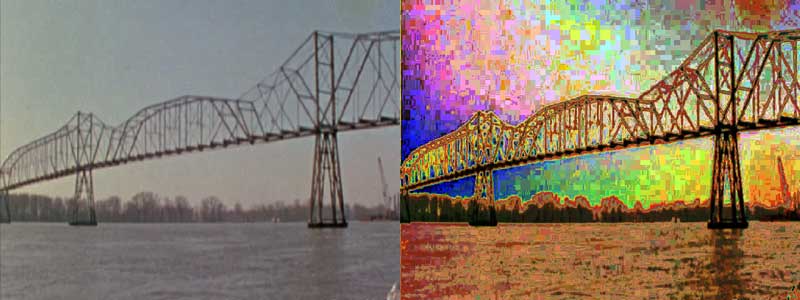

The second example is taken from this short (15 second) demo clip.
The Fauve plugin is packaged in ckffplugs-1.0.13, available for download here:
http://ffrend.sourceforge.net/download.html
(Freeframe Plugins, Binary Release)
And for those who care about such things the source is there also.
The plugin is a visualization of a histogram but using pseudocolor instead of the customary graph. Pixels are colored according to the popularity of their original colors in the input image, such that more common input colors translate to brighter output colors. The effect enhances edges, adds texture, simplifies and drastically alters the palette, and reduces spatial cohesion. In Luma mode, the plugin:
1. Calculates the frame's luma histogram.
2. Replaces each pixel with a greyscale value corresponding to that pixel's rank in the luma histogram. The histogram is normalized so that pixels in the top rank are assigned white in the output, while pixels in lower ranks receive proportionally darker values.
RGB mode is similar, but does the above operations separately for each color channel, resulting in color output instead of greyscale.
can read about it how it works.
No doubt André Derain is rolling in his grave...

André Derain, The Houses of Parliament (1906)
The second example is taken from this short (15 second) demo clip.
The Fauve plugin is packaged in ckffplugs-1.0.13, available for download here:
http://ffrend.sourceforge.net/download.html
(Freeframe Plugins, Binary Release)
And for those who care about such things the source is there also.
The plugin is a visualization of a histogram but using pseudocolor instead of the customary graph. Pixels are colored according to the popularity of their original colors in the input image, such that more common input colors translate to brighter output colors. The effect enhances edges, adds texture, simplifies and drastically alters the palette, and reduces spatial cohesion. In Luma mode, the plugin:
1. Calculates the frame's luma histogram.
2. Replaces each pixel with a greyscale value corresponding to that pixel's rank in the luma histogram. The histogram is normalized so that pixels in the top rank are assigned white in the output, while pixels in lower ranks receive proportionally darker values.
RGB mode is similar, but does the above operations separately for each color channel, resulting in color output instead of greyscale.
can read about it how it works.
No doubt André Derain is rolling in his grave...
André Derain, The Houses of Parliament (1906)
Tuesday, December 27, 2011
FFRend adds playlist feature: handy for installations
The latest version of FFRend (2.2.01) introduces a playlist, better integrates the load-balancing feature, improves memory management, and fixes a number of bugs.
FFRend can now automatically open a series of projects, also known as a playlist. This feature is primarily intended to allow unattended use of FFRend, e.g. in an installation or gallery setting, though it's also helpful for VJs who need a break during a show. The user specifies the list of projects, the interval between project changes, whether the list should be played in sequential or random order, and whether it should loop. The playlist can be passed via the command line, in which case FFRend starts up with the playlist playing. This is particularly useful in combination with the new /fullscreen command-line option, which causes FFRend to start up full-screen on whichever monitor contains the output window.
The Load Balance feature was converted from a modal dialog to a control bar, allowing load to be monitored continuously during normal operation. The command is now View/Load Balance instead of Edit/Load Balance.
FFRend's handling of low memory conditions was improved, and advanced options were added which allow memory use to be limited in various ways. This can be helpful when working with large frame sizes.
Download:
http://ffrend.sourceforge.net/download.html
Release Notes:
http://ffrend.sourceforge.net/relnotes.html
FFRend (Freeframe Renderer) is a free, open-source renderer for Freeframe V1 plugins. It allows you to chain any number of plugins together in any type of routing, automate their parameters using oscillators, and display the output full-screen and/or record it to a file. FFRend has a modular interface, includes MIDI and dual-monitor support, supports plugin authoring via metaplugins, and leverages multicore CPUs by running each plugin in its own thread.
FFRend can now automatically open a series of projects, also known as a playlist. This feature is primarily intended to allow unattended use of FFRend, e.g. in an installation or gallery setting, though it's also helpful for VJs who need a break during a show. The user specifies the list of projects, the interval between project changes, whether the list should be played in sequential or random order, and whether it should loop. The playlist can be passed via the command line, in which case FFRend starts up with the playlist playing. This is particularly useful in combination with the new /fullscreen command-line option, which causes FFRend to start up full-screen on whichever monitor contains the output window.
The Load Balance feature was converted from a modal dialog to a control bar, allowing load to be monitored continuously during normal operation. The command is now View/Load Balance instead of Edit/Load Balance.
FFRend's handling of low memory conditions was improved, and advanced options were added which allow memory use to be limited in various ways. This can be helpful when working with large frame sizes.
Download:
http://ffrend.sourceforge.net/download.html
Release Notes:
http://ffrend.sourceforge.net/relnotes.html
FFRend (Freeframe Renderer) is a free, open-source renderer for Freeframe V1 plugins. It allows you to chain any number of plugins together in any type of routing, automate their parameters using oscillators, and display the output full-screen and/or record it to a file. FFRend has a modular interface, includes MIDI and dual-monitor support, supports plugin authoring via metaplugins, and leverages multicore CPUs by running each plugin in its own thread.
Wednesday, December 21, 2011
Bifurcations: digital emulations of analog video feedback
Lately I've been experimenting with digital emulations of analog video feedback, with interesting results. I enclose a link to sample clips below. All the projects in this family share the constraint of having no "content" (i.e. source plugins) other than Radar and WaveGen. No clips or Whorld, just Radar, WaveGen, and feedback (usually multiple luma feedback loops with different effects on each loop). I'm particularly excited about "Starry Night" and "Fireplace".
Bifurcations
However there's an unexpected problem. I'm finding that I can't get the kind of results shown in these clips without using some kind of mirror, kaleidoscope, or similar effect. I get the best results by automating the scale parameters of IscHypnotic. This is contrary to what I know about analog feedback. For analog feedback all I typically need is:
1. Looping: in analog this is created by pointing the video camera at the monitor, but in digital the equivalent is e.g. an alpha mixer, luma key, or chroma key with one of its inputs looped back from the output.
2. Decay offset: in analog this is usually accomplished with a TBC, but in digital various types of color or luma shifts can be substituted.
3. Motion: in analog, the motion typically comes from moving the camera, but in digital a simple pan/spin/zoom should in theory work.
But when I try digital setups this simple, I don't get interesting results unless I make the motion component much more complicated. This isn't necessarily bad, but it does give the output a characteristic look (radial, or at least symmetrical). In the case of IscHypnotic it also introduces significant pixelization, which is one of the main objections to digital feedback.
Another interesting result is enclosed below. The FFRend project that generated this image always converges on the state shown. Perturb it all you like, and it either breaks completely or converges again. The branches are a perfect demonstration of the role of bifurcation in natural systems. If you ever had any doubts that nature is chaotic, this should dispel them.

But why does this particular project do it? I don't have any other projects that create this shape, and I can't get it to work without IscHypnotic either. It's all very puzzling. What is the role of the mirror/kaleidoscope/hypnotic in all this? The "Fireplace" clip suggests that there might be a way around it.
Examine the texture in the "Etched Chaos" clip. At some points it resembles feathers, or scales. Again it's clearly organic, and reminiscent of Mandelbrot and other fractals. There's a critical tipping point where it starts "budding" like a plant, but then it quickly exhausts itself and the moment slips away. Could it be possible to stabilize it?
Sensitivity to initial conditions is just the nature of chaos. I remember from the analog days that the feedback setups were absurdly sensitive. It was fussy work that required patience and a steady hand, and some people were better at it than others. There were magical cameras, magical monitors, even magical cables. Sometimes two cameras of the exact same model behaved drastically differently for no obvious reason. Nonetheless people managed to stabilize intense bifurcations for minutes or hours.
Back in the day, analog feedback purists often told me that I would never get similar results digitally. Electric Sheep was an interesting counter-example, but wasn't directly comparable since it's not even close to being a real-time process. I always held that it was just a question of time, and that parallel processing and Moore's law would eventually catch up. All of these new projects run at 30 FPS at XGA resolution on an i7 PC. The results convince me (and some of my most hard-headed analog purist friends) not only that it's possible to convincingly emulate analog feedback in real time, but that digital feedback has the potential to exceed analog feedback in terms of aesthetic variety.
Bifurcations
However there's an unexpected problem. I'm finding that I can't get the kind of results shown in these clips without using some kind of mirror, kaleidoscope, or similar effect. I get the best results by automating the scale parameters of IscHypnotic. This is contrary to what I know about analog feedback. For analog feedback all I typically need is:
1. Looping: in analog this is created by pointing the video camera at the monitor, but in digital the equivalent is e.g. an alpha mixer, luma key, or chroma key with one of its inputs looped back from the output.
2. Decay offset: in analog this is usually accomplished with a TBC, but in digital various types of color or luma shifts can be substituted.
3. Motion: in analog, the motion typically comes from moving the camera, but in digital a simple pan/spin/zoom should in theory work.
But when I try digital setups this simple, I don't get interesting results unless I make the motion component much more complicated. This isn't necessarily bad, but it does give the output a characteristic look (radial, or at least symmetrical). In the case of IscHypnotic it also introduces significant pixelization, which is one of the main objections to digital feedback.
Another interesting result is enclosed below. The FFRend project that generated this image always converges on the state shown. Perturb it all you like, and it either breaks completely or converges again. The branches are a perfect demonstration of the role of bifurcation in natural systems. If you ever had any doubts that nature is chaotic, this should dispel them.
But why does this particular project do it? I don't have any other projects that create this shape, and I can't get it to work without IscHypnotic either. It's all very puzzling. What is the role of the mirror/kaleidoscope/hypnotic in all this? The "Fireplace" clip suggests that there might be a way around it.
Examine the texture in the "Etched Chaos" clip. At some points it resembles feathers, or scales. Again it's clearly organic, and reminiscent of Mandelbrot and other fractals. There's a critical tipping point where it starts "budding" like a plant, but then it quickly exhausts itself and the moment slips away. Could it be possible to stabilize it?
Sensitivity to initial conditions is just the nature of chaos. I remember from the analog days that the feedback setups were absurdly sensitive. It was fussy work that required patience and a steady hand, and some people were better at it than others. There were magical cameras, magical monitors, even magical cables. Sometimes two cameras of the exact same model behaved drastically differently for no obvious reason. Nonetheless people managed to stabilize intense bifurcations for minutes or hours.
Back in the day, analog feedback purists often told me that I would never get similar results digitally. Electric Sheep was an interesting counter-example, but wasn't directly comparable since it's not even close to being a real-time process. I always held that it was just a question of time, and that parallel processing and Moore's law would eventually catch up. All of these new projects run at 30 FPS at XGA resolution on an i7 PC. The results convince me (and some of my most hard-headed analog purist friends) not only that it's possible to convincingly emulate analog feedback in real time, but that digital feedback has the potential to exceed analog feedback in terms of aesthetic variety.
Thursday, May 19, 2011
Load balancing
FFRend 2.1.00 adds an important performance-related feature (load balancing), and fixes a large number of bugs, some of them serious. Issues marked (V2) are specific to version 2.
For more on how to use load balancing, see the load balancing manual page. For the theory behind load balancing, see my article Pipelining for Plugin Chains.
1. A load balancing dialog was added, which allows multiple threads to be assigned to a plugin. Given sufficient cores, load balancing can greatly improve throughput in the common case where some plugins require significantly more CPU time than others (asymmetrical loading). The dialog is accessed via Edit/Load Balance or Shift+L. Load balance settings are stored in the project. Note that load balancing is only effective for stateless filters: assigning multiple threads to a stateful filter may cause output strobing.
2. Changing the frame rate in the Options dialog caused an incorrect recording length if the record duration was specified in time (as opposed to frames). Fixed.
3. The single step command wasn't updating the slider positions of modulated parameters. Fixed. (V2)
4. In the history view, the zoom setting now persists in the registry. (V2)
5. In the history view, the renderer's display name was changed from Output to Renderer, to be consistent with the other views. (V2)
6. The file browser's list control had an extra border (in XP and up) which appeared as a thin black outline. Fixed.
7. In the file browser, some editing keys (Delete, Insert, Escape, Ctrl+Z) behaved unexpectedly during label editing: they triggered app behaviors instead of edit control behaviors. Fixed.
8. Pressing the Escape key while dragging a plugin tab, patch row, or metaparameter row failed to cancel the drag operation. Fixed. (V2)
9. Pressing the Escape key failed to cancel a drag operation if a dialog row control had focus. Fixed.
10. If an error occurred while restoring the job control state, invalid jobs could result and persist. Partial data is now purged, and the user is given the option to delete the potentially corrupt job control file.
11. Restarting the engine caused frame queues to be destroyed and recreated, incurring needless overhead; the queues are now resized instead. (V2)
12. The options dialog was converted from a dialog to a property sheet, allowing related options to be grouped into pages for easier comprehension.
13. Changing the MIDI device can be slow if the CPU is heavily loaded, so a wait cursor is now shown, and the main frame is explicitly updated to ensure that the options dialog erases cleanly.
14. The sync oscillators command (Edit/Sync Oscillators) was initially removed in V2, but it's been restored. (V2)
15. The graph view was causing a handle leak, in which each graph update would leak two process information handles. The bug could be demonstrated by resizing the graph view. Fixed. (V2)
16. Deleting a plugin or opening a new project could cause a serious memory leak, which would occur while shrinking the frame buffer pool. As many as two frames could leak, depending on whether any of the deleted frames were currently assigned to a DirectDraw surface. Repeatedly undoing and redoing a plugin deletion would eventually demonstrate the bug. Fixed. (V2)
17. Dropping files onto the app from Explorer would leak heap memory, due to OnDropFiles failing to call DragFinish. Fixed.
18. Left-clicking a parameter slider's thumb without moving it added an undo event, even though the parameter value was unchanged. Fixed.
19. Opening a recent file via the file menu could cause the file menu to bounce, i.e. redisplay unexpectedly. This occurred after deleting a row in the Parameter, Patch, MIDI Setup, or Metaparameter views, while one its controls had focus, which would cause a hidden form view to receive focus. Fixed. (V2)
20. If MIDI Setup was showing a plugin-specific page, and one of the page's row controls had focus, attempting to select a main menu command via the Alt key would cause an infinite loop, permanently hanging the app. This is the infamous WM_GETDLGCODE bug, solved by removing the DS_CONTROL style from the MIDI Setup dialog. Fixed.
21. If a metaparameter was added while the Metaparams view was hidden, and the MIDI Setup view was visible and showing its Metaparam page, the new metaparameter wouldn't immediately appear in MIDI Setup. It would appear when the MIDI Setup view was next updated, e.g. by hiding and reshowing it or selecting a different page. This could occur when creating a metaparameter via the main view's context menu. Fixed. (V2)
22. In the MIDI and Metaparameter views, the header columns didn't line up correctly with their corresponding controls, due to a row item coordinate conversion error. Fixed. (V2)
23. Right-clicking the History view's scroll bars showed the view's context menu, instead of the scroll bar context menu. Fixed. (V2)
For more on how to use load balancing, see the load balancing manual page. For the theory behind load balancing, see my article Pipelining for Plugin Chains.
1. A load balancing dialog was added, which allows multiple threads to be assigned to a plugin. Given sufficient cores, load balancing can greatly improve throughput in the common case where some plugins require significantly more CPU time than others (asymmetrical loading). The dialog is accessed via Edit/Load Balance or Shift+L. Load balance settings are stored in the project. Note that load balancing is only effective for stateless filters: assigning multiple threads to a stateful filter may cause output strobing.
2. Changing the frame rate in the Options dialog caused an incorrect recording length if the record duration was specified in time (as opposed to frames). Fixed.
3. The single step command wasn't updating the slider positions of modulated parameters. Fixed. (V2)
4. In the history view, the zoom setting now persists in the registry. (V2)
5. In the history view, the renderer's display name was changed from Output to Renderer, to be consistent with the other views. (V2)
6. The file browser's list control had an extra border (in XP and up) which appeared as a thin black outline. Fixed.
7. In the file browser, some editing keys (Delete, Insert, Escape, Ctrl+Z) behaved unexpectedly during label editing: they triggered app behaviors instead of edit control behaviors. Fixed.
8. Pressing the Escape key while dragging a plugin tab, patch row, or metaparameter row failed to cancel the drag operation. Fixed. (V2)
9. Pressing the Escape key failed to cancel a drag operation if a dialog row control had focus. Fixed.
10. If an error occurred while restoring the job control state, invalid jobs could result and persist. Partial data is now purged, and the user is given the option to delete the potentially corrupt job control file.
11. Restarting the engine caused frame queues to be destroyed and recreated, incurring needless overhead; the queues are now resized instead. (V2)
12. The options dialog was converted from a dialog to a property sheet, allowing related options to be grouped into pages for easier comprehension.
13. Changing the MIDI device can be slow if the CPU is heavily loaded, so a wait cursor is now shown, and the main frame is explicitly updated to ensure that the options dialog erases cleanly.
14. The sync oscillators command (Edit/Sync Oscillators) was initially removed in V2, but it's been restored. (V2)
15. The graph view was causing a handle leak, in which each graph update would leak two process information handles. The bug could be demonstrated by resizing the graph view. Fixed. (V2)
16. Deleting a plugin or opening a new project could cause a serious memory leak, which would occur while shrinking the frame buffer pool. As many as two frames could leak, depending on whether any of the deleted frames were currently assigned to a DirectDraw surface. Repeatedly undoing and redoing a plugin deletion would eventually demonstrate the bug. Fixed. (V2)
17. Dropping files onto the app from Explorer would leak heap memory, due to OnDropFiles failing to call DragFinish. Fixed.
18. Left-clicking a parameter slider's thumb without moving it added an undo event, even though the parameter value was unchanged. Fixed.
19. Opening a recent file via the file menu could cause the file menu to bounce, i.e. redisplay unexpectedly. This occurred after deleting a row in the Parameter, Patch, MIDI Setup, or Metaparameter views, while one its controls had focus, which would cause a hidden form view to receive focus. Fixed. (V2)
20. If MIDI Setup was showing a plugin-specific page, and one of the page's row controls had focus, attempting to select a main menu command via the Alt key would cause an infinite loop, permanently hanging the app. This is the infamous WM_GETDLGCODE bug, solved by removing the DS_CONTROL style from the MIDI Setup dialog. Fixed.
21. If a metaparameter was added while the Metaparams view was hidden, and the MIDI Setup view was visible and showing its Metaparam page, the new metaparameter wouldn't immediately appear in MIDI Setup. It would appear when the MIDI Setup view was next updated, e.g. by hiding and reshowing it or selecting a different page. This could occur when creating a metaparameter via the main view's context menu. Fixed. (V2)
22. In the MIDI and Metaparameter views, the header columns didn't line up correctly with their corresponding controls, due to a row item coordinate conversion error. Fixed. (V2)
23. Right-clicking the History view's scroll bars showed the view's context menu, instead of the scroll bar context menu. Fixed. (V2)
Sunday, June 20, 2010
FFRend V2: multicore version released!
FFRend 2.0.00 is a near-total rewrite, not an upgrade. The application was completely redesigned from the ground up to take advantage of the parallel-processing capabilities of today's multi-core CPUs.
Major differences
1. Each plugin now runs in its own thread, and given sufficient cores, each plugin runs on its own core, so that throughput is limited only by the slowest plugin (Amdahl's law).
2. The user interface is now much more responsive, even when the CPU is heavily loaded, because rendering no longer occurs in the UI thread.
3. The built-in clip player was replaced by an enhanced version of PlayerFF which allows clips to be opened by path, or by dragging from the Files bar's Clips pane.
4. Monitor quality has been improved and now has two settings (fast or smooth), specified in the options dialog. Even the fast setting is still an improvement over version 1.
5. Multiple instances of the same plugin are now differentiated by decorating their names, e.g. PeteMixer-1, PeterMixer-2, etc.
6. Plugins with more than two inputs are now supported.
7. A Graph view is now available, which shows a dynamically updated graph of your current routing. Note that you must download and install graphviz to use this feature.
8. Two additional new views, History and Queues, provide dynamic information about the rendering engine, allowing you to easily determine which plugins are limiting throughput.
9. The frame rate can now be unlocked, so that the engine renders as fast as possible, or at the monitor refresh rate in full-screen mode.
Minor differences
1. The Record command was moved from the View menu to the File menu, and the Options command moved from the View menu to the Edit menu.
2. The Export and Record commands no longer automatically pause the output.
3. The Bypass command no longer alters the routing. This can cause significantly different behavior, particularly when bypassing source plugins.
4. All sizing control bars now have a system menu option to control whether they're dockable.
5. There's no longer a distinction between Full-Screen and Exclusive modes, i.e. Full-Screen mode is always Exclusive. Consequently the app's UI is no longer accessible in Full-Screen mode without using a dual-monitor setup.
6. Metaplugins are still fully supported. Note however that metaplugins are internally single-threaded, i.e. a metaplugin's component plugins do not run in parallel with each other. Consequently, on a multicore machine, a typical metaplugin will run more slowly than the equivalent project.
7. If a plugin can't render because it's not routed to the output, any parameter modulations it has will not automate their corresponding sliders in the UI.
8. The Global Plugin and Monitor Source Selection features were removed.
9. The app now builds in VC++ 9.0.
Major differences
1. Each plugin now runs in its own thread, and given sufficient cores, each plugin runs on its own core, so that throughput is limited only by the slowest plugin (Amdahl's law).
2. The user interface is now much more responsive, even when the CPU is heavily loaded, because rendering no longer occurs in the UI thread.
3. The built-in clip player was replaced by an enhanced version of PlayerFF which allows clips to be opened by path, or by dragging from the Files bar's Clips pane.
4. Monitor quality has been improved and now has two settings (fast or smooth), specified in the options dialog. Even the fast setting is still an improvement over version 1.
5. Multiple instances of the same plugin are now differentiated by decorating their names, e.g. PeteMixer-1, PeterMixer-2, etc.
6. Plugins with more than two inputs are now supported.
7. A Graph view is now available, which shows a dynamically updated graph of your current routing. Note that you must download and install graphviz to use this feature.
8. Two additional new views, History and Queues, provide dynamic information about the rendering engine, allowing you to easily determine which plugins are limiting throughput.
9. The frame rate can now be unlocked, so that the engine renders as fast as possible, or at the monitor refresh rate in full-screen mode.
Minor differences
1. The Record command was moved from the View menu to the File menu, and the Options command moved from the View menu to the Edit menu.
2. The Export and Record commands no longer automatically pause the output.
3. The Bypass command no longer alters the routing. This can cause significantly different behavior, particularly when bypassing source plugins.
4. All sizing control bars now have a system menu option to control whether they're dockable.
5. There's no longer a distinction between Full-Screen and Exclusive modes, i.e. Full-Screen mode is always Exclusive. Consequently the app's UI is no longer accessible in Full-Screen mode without using a dual-monitor setup.
6. Metaplugins are still fully supported. Note however that metaplugins are internally single-threaded, i.e. a metaplugin's component plugins do not run in parallel with each other. Consequently, on a multicore machine, a typical metaplugin will run more slowly than the equivalent project.
7. If a plugin can't render because it's not routed to the output, any parameter modulations it has will not automate their corresponding sliders in the UI.
8. The Global Plugin and Monitor Source Selection features were removed.
9. The app now builds in VC++ 9.0.
Saturday, April 24, 2010
FFRell (FFRend in parallel) coming soon
There's been lots of progress on FFRell, the parallel-processing version of FFRend. I'm currently running FFRell at 1024 x 768 on a purpose-built i7 box (8 CPUs with Hyperthreading) and seeing frame rates from 30 to 60 Hz for quite complex patches. FFRend has been completely rebuilt around a multithreaded pipelined rendering engine. Each plugin runs in its own thread, and frames are routed via thread-safe zero-copy pointer queues.
I started by building a test system called ParaPET (Parallel Plugin Engine Test) which is an interesting project by itself; see the enclosed screen shot. Basically ParaPET is a tool for modeling the problem of optimal parallelism for arbitrary signal routes. The first case I had to deal with was feedback. If plugin A takes input from plugin B, and B also takes input from A, neither plugin can get started and the engine stalls. The solution is to prime one of the plugins, i.e. feed it blank frames until the feedback loop is closed and becomes self-sustaining. But first you need a general way of identifying such cases in all their permutations. ParaPET features a spider object which recursively crawls the plugins looking for feedback.
The other interesting case is when a plugin's output can arrive at a downstream mixer via multiple routes of different lengths. A simple example would be a source plugin that connects to both inputs of a mixer, one directly and the other via an effect. In such cases you'll get staggering, i.e. the plugins won't execute in parallel despite available CPUs. The solution is to add delay to the shorter route, so that the route lengths become equal again. Delay is added to a route by increasing the size of the corresponding frame queue.
This turned out to be a pretty hard problem to solve for all possible cases. Again the solution was recursion. The same crawl that detects feedback also gathers the necessary information for route balancing: for each plugin, 1) its maximum distance from the final output, and 2) for each sink mixer it's connected to, its distance from that mixer (distances are measured in hops, just as in network topology). With this information in hand, for each plugin, we can determine its longest route to a sink mixer, and compensate any shorter routes accordingly.
I came up with dozens of tough asymmetric test cases, including three- and four-input mixers, and the spider handles them all. It works so well I'm considering releasing ParaPET as a separate project. It's not tied to video processing so it would make a good general framework for pipelined parallel execution of interdependent tasks. If you're interested in playing with it let me know...

Once I got the engine working in ParaPET, I started building a new app (ParaFFEn) that used the same thread architecture but with FreeFrame plugins and actual video frames. The goal was to eventually port the engine into FFRend, but after hours of surgery the patient died: FFRend was just too single-thread oriented and couldn't adapt, so I gave up and started rebuilding FFRend from scratch, starting with ParaFFEn's engine.
After a long hard slog, FFRell can now read FFRend projects and run them in full-screen dual-monitor Exclusive mode. All of FFRend's GUI elements are included except the file browser and monitor bars. FFRell also includes the nifty dynamic graph view from ParaPET (courtesy of GraphViz), plus the scrolling execution history and queue views. What's not working includes recording, clipboard support, MIDI, and undo. Also FFRell can't create metaplugins, though it can load them. Plenty to keep me busy this summer. I hope to have a reasonably stable version by Q3.
I started by building a test system called ParaPET (Parallel Plugin Engine Test) which is an interesting project by itself; see the enclosed screen shot. Basically ParaPET is a tool for modeling the problem of optimal parallelism for arbitrary signal routes. The first case I had to deal with was feedback. If plugin A takes input from plugin B, and B also takes input from A, neither plugin can get started and the engine stalls. The solution is to prime one of the plugins, i.e. feed it blank frames until the feedback loop is closed and becomes self-sustaining. But first you need a general way of identifying such cases in all their permutations. ParaPET features a spider object which recursively crawls the plugins looking for feedback.
The other interesting case is when a plugin's output can arrive at a downstream mixer via multiple routes of different lengths. A simple example would be a source plugin that connects to both inputs of a mixer, one directly and the other via an effect. In such cases you'll get staggering, i.e. the plugins won't execute in parallel despite available CPUs. The solution is to add delay to the shorter route, so that the route lengths become equal again. Delay is added to a route by increasing the size of the corresponding frame queue.
This turned out to be a pretty hard problem to solve for all possible cases. Again the solution was recursion. The same crawl that detects feedback also gathers the necessary information for route balancing: for each plugin, 1) its maximum distance from the final output, and 2) for each sink mixer it's connected to, its distance from that mixer (distances are measured in hops, just as in network topology). With this information in hand, for each plugin, we can determine its longest route to a sink mixer, and compensate any shorter routes accordingly.
I came up with dozens of tough asymmetric test cases, including three- and four-input mixers, and the spider handles them all. It works so well I'm considering releasing ParaPET as a separate project. It's not tied to video processing so it would make a good general framework for pipelined parallel execution of interdependent tasks. If you're interested in playing with it let me know...
Once I got the engine working in ParaPET, I started building a new app (ParaFFEn) that used the same thread architecture but with FreeFrame plugins and actual video frames. The goal was to eventually port the engine into FFRend, but after hours of surgery the patient died: FFRend was just too single-thread oriented and couldn't adapt, so I gave up and started rebuilding FFRend from scratch, starting with ParaFFEn's engine.
After a long hard slog, FFRell can now read FFRend projects and run them in full-screen dual-monitor Exclusive mode. All of FFRend's GUI elements are included except the file browser and monitor bars. FFRell also includes the nifty dynamic graph view from ParaPET (courtesy of GraphViz), plus the scrolling execution history and queue views. What's not working includes recording, clipboard support, MIDI, and undo. Also FFRell can't create metaplugins, though it can load them. Plenty to keep me busy this summer. I hope to have a reasonably stable version by Q3.
Saturday, December 08, 2007
MIDI control of monitor source
These are the changes needed to implement MIDI control of monitor source:
in MidiInfo.h:
in MainMidi.cpp:
The above change also requires a new version of the project file format, otherwise errors will occur in CFFPlugInfo::Serialize due the increased size of m_MidiInfo. This probably could have been avoided if the size of m_MidiInfo had been serialized, but it's too late for that now. The only remaining option is an explicit version test. Note that the version being tested is from the next level up, i.e. it's a CFFProject version, not a CFFPlugInfo version. The CFFPlugInfo version must be increased too, so that the clipboard format changes.
in MidiInfo.h:
enum {  // plugin MIDI properties
    MP_BYPASS,
    MP_MONITOR,
    PLUGIN_MIDI_PROPS
};
in MainMidi.cpp:
const int CMainFrame::m_PluginMidiPropName[PLUGIN_MIDI_PROPS] = {
    IDS_MP_BYPASS,
    IDS_MP_MONITOR
};

case MP_MONITOR:
    if (Toggle)
        Val = (GetMonitorSource() != ParmIdx);
    {
        bool    IsMod = IsModified();
        SetMonitorSource(Val >= .5 ? ParmIdx : -1);
        SetModify(IsMod);   // restore modify flag
    }
    break;
The above change also requires a new version of the project file format, otherwise errors will occur in CFFPlugInfo::Serialize due the increased size of m_MidiInfo. This probably could have been avoided if the size of m_MidiInfo had been serialized, but it's too late for that now. The only remaining option is an explicit version test. Note that the version being tested is from the next level up, i.e. it's a CFFProject version, not a CFFPlugInfo version. The CFFPlugInfo version must be increased too, so that the clipboard format changes.
// this was tested and works fine
int MidiInfoSize = Version > 4 ? sizeof(m_MidiInfo) : sizeof(CMidiInfo);
...
ar.Write(m_MidiInfo, MidiInfoSize);
...
ar.Read(m_MidiInfo, MidiInfoSize);
Thursday, September 27, 2007
Thumbnail thread exit problem
If we're in thumbnail view, the thumbnail thread could be running, and we want it to exit, so we can safely launch another instance. We ask it to exit by incrementing the job ID; the thread checks the job ID after each extraction, and exits if the ID changes. This simple method has a weakness: there's a chance we preempted the thread after it checked the ID, but before it posted the bitmap to us, in which case we'll receive a spurious bitmap message. The thread is almost always busy extracting, so the chance is very small, but just in case, we increment the job ID before doing other work, thereby giving the thread more time to exit.
Sunday, July 29, 2007
Projects are affected by changing frame rate
Frame rate has turned out to be a major hassle. It probably would have been a good idea for projects to store the frame rate that was in effect which the project was saved, so that if the project is subsequently run at a different frame rate, the oscillator frequencies could then be compensated. Oh well.
Practically speaking, all of the projects that are currently being prepared for DVD render correctly at 25 FPS ONLY. This includes
big hex 27%
UltraWhorld 3b
UltraWhorld 4b
Just to make things even more confusing, there's a problem with PeteKaleidascope on the XP machine: at Divisions = .03 (horizontal mirroring), it creates ghosts. This can be observed clearly with the UltraWhorld 4b patch. The solution is to use a mirror plugin instead.
Practically speaking, all of the projects that are currently being prepared for DVD render correctly at 25 FPS ONLY. This includes
big hex 27%
UltraWhorld 3b
UltraWhorld 4b
Just to make things even more confusing, there's a problem with PeteKaleidascope on the XP machine: at Divisions = .03 (horizontal mirroring), it creates ghosts. This can be observed clearly with the UltraWhorld 4b patch. The solution is to use a mirror plugin instead.
Friday, July 13, 2007
Hidden controls retain focus; child dialogs and DS_CONTROL
Version 1.4.03 (and previous versions) crash deterministically if you load (via drag/drop) a plugin with at least one parameter, then load (again via drag/drop) a plugin with NO parameters, and then spin the mouse wheel, or press one of the arrow keys or editing keys. This turns out to be an example of a more general problem: if a control has focus, hiding its parent dialog does NOT take focus away from the control. The control continues to receive mouse and keyboard input. This can cause unexpected behavior (e.g. the wheel moving an invisible control) or even crash the app. But why do we have hidden dialogs? Here's why.
FFRend makes much use of the row view. This custom UI object is similar to a list view or grid control, but it's implemented as a form view containing a vertical list of child dialogs, one per row. A row dialog is just like any other dialog: it has a resource, contains controls, can be built using the Class Wizard, and can even be tested outside the containing view. The main advantage of this approach is encapsulation: row dialogs derive from a base class which makes it easier to operate on entire rows at once (e.g. for cut/copy/paste). By contrast, in a grid control, everything is contained in a single window, so there's no equivalent to a row object.
FFRend uses the row view to display plugin parameters, patchbay, MIDI setup, and metaparameters. In the case of plugin parameters, there's a complication: each plugin has different parameters, but only one plugin's parameters are visible at a time. FFRend allows each plugin to have its own set of row dialogs, and then shows and hides entire sets of row dialogs as needed. For example, when a plugin is selected, the previously selected plugin's rows are hidden, and the new plugin's rows are shown. This approach is wasteful in terms of memory, windows, and GDI objects, but efficient in terms of CPU usage: hiding/showing windows is cheap compared to creating and destroying them. The approach has another advantage: since we can assume that while a plugin exists, its parameter row dialogs also exist, we can store the parameter and automation data in the row controls, instead of storing them elsewhere and updating the controls on demand. This is elegant, and simplifies undo handling. So that's why we have hidden dialogs.
As it turns out, a dialog has to have the DS_CONTROL style in order to behave well as a child of another window. People often encounter this issue when they try to make a home-grown property sheet, i.e. a series of child dialogs that can be overlaid onto a parent container dialog. The usual problem is that without DS_CONTROL, tabbing doesn't work as expected: the entire child dialog is treated as a single tab stop. DS_CONTROL integrates the child dialog's tab layout into the tab layout of the parent window. FFRend used to handle tabbing in row views explicitly, but now that it's using DS_CONTROL, Windows handles the tabbing.
DS_CONTROL also improves window activation behavior: without DS_CONTROL, showing the parent window unexpectedly focuses the last control in the child dialog, and this can lead to the problem described above (hidden controls with focus). So DS_CONTROL is a very good discovery, and makes the row view UI much more robust, but it's still necessary to test for a hidden control with focus after updating the plugin parameters view. That's not such a big deal.
FFRend makes much use of the row view. This custom UI object is similar to a list view or grid control, but it's implemented as a form view containing a vertical list of child dialogs, one per row. A row dialog is just like any other dialog: it has a resource, contains controls, can be built using the Class Wizard, and can even be tested outside the containing view. The main advantage of this approach is encapsulation: row dialogs derive from a base class which makes it easier to operate on entire rows at once (e.g. for cut/copy/paste). By contrast, in a grid control, everything is contained in a single window, so there's no equivalent to a row object.
FFRend uses the row view to display plugin parameters, patchbay, MIDI setup, and metaparameters. In the case of plugin parameters, there's a complication: each plugin has different parameters, but only one plugin's parameters are visible at a time. FFRend allows each plugin to have its own set of row dialogs, and then shows and hides entire sets of row dialogs as needed. For example, when a plugin is selected, the previously selected plugin's rows are hidden, and the new plugin's rows are shown. This approach is wasteful in terms of memory, windows, and GDI objects, but efficient in terms of CPU usage: hiding/showing windows is cheap compared to creating and destroying them. The approach has another advantage: since we can assume that while a plugin exists, its parameter row dialogs also exist, we can store the parameter and automation data in the row controls, instead of storing them elsewhere and updating the controls on demand. This is elegant, and simplifies undo handling. So that's why we have hidden dialogs.
As it turns out, a dialog has to have the DS_CONTROL style in order to behave well as a child of another window. People often encounter this issue when they try to make a home-grown property sheet, i.e. a series of child dialogs that can be overlaid onto a parent container dialog. The usual problem is that without DS_CONTROL, tabbing doesn't work as expected: the entire child dialog is treated as a single tab stop. DS_CONTROL integrates the child dialog's tab layout into the tab layout of the parent window. FFRend used to handle tabbing in row views explicitly, but now that it's using DS_CONTROL, Windows handles the tabbing.
DS_CONTROL also improves window activation behavior: without DS_CONTROL, showing the parent window unexpectedly focuses the last control in the child dialog, and this can lead to the problem described above (hidden controls with focus). So DS_CONTROL is a very good discovery, and makes the row view UI much more robust, but it's still necessary to test for a hidden control with focus after updating the plugin parameters view. That's not such a big deal.
Monday, June 18, 2007
XP/Uno drops input MIDI running status messages
The problem occurs when using WhorldRC to switch video clips quickly in the PlayerFF plugin. The problem first appeared when shortcut keys were added to WhorldRC for triggering recent clips. Before that it wasn't possible to switch clips fast enough to cause the bug. It seems that when MIDI messages are output close together in time, Windows uses MIDI running status, otherwise not. This was verified using the DOS mididump program. The running status messages are NOT received by the MIDI input callback under XP with the M-Audio Uno. This is true using both the driver that shipped with the Uno, and the Windows default driver. Note that with the latest M-Audio driver (MA_CMIDI_WDM_4.2.03v4.exe), the callback DOES receive events for the running status messages, but they are strangely garbled.
Attempts to reproduce the problem using the X-Session as input were not succesful. Perhaps it's the particular nature of WhorldRC's output (b0 00 xx b0 01 xx) that causes the bug? The most likely suspects are the Uno itself, its driver, or XP's USB MIDI driver. One way to test this would be by using a different MIDI device.
For the moment the workaround is a hack to WhorldRC: it sends a note off command after each set of bank/clip commands commands. This is a bit wasteful but WhorldRC is a low-bandwidth app and it seems to have no side effects.
Attempts to reproduce the problem using the X-Session as input were not succesful. Perhaps it's the particular nature of WhorldRC's output (b0 00 xx b0 01 xx) that causes the bug? The most likely suspects are the Uno itself, its driver, or XP's USB MIDI driver. One way to test this would be by using a different MIDI device.
For the moment the workaround is a hack to WhorldRC: it sends a note off command after each set of bank/clip commands commands. This is a bit wasteful but WhorldRC is a low-bandwidth app and it seems to have no side effects.
Subscribe to:
Posts (Atom)
